Buying guide
Why the RTX A4500 is a great buy for local AI
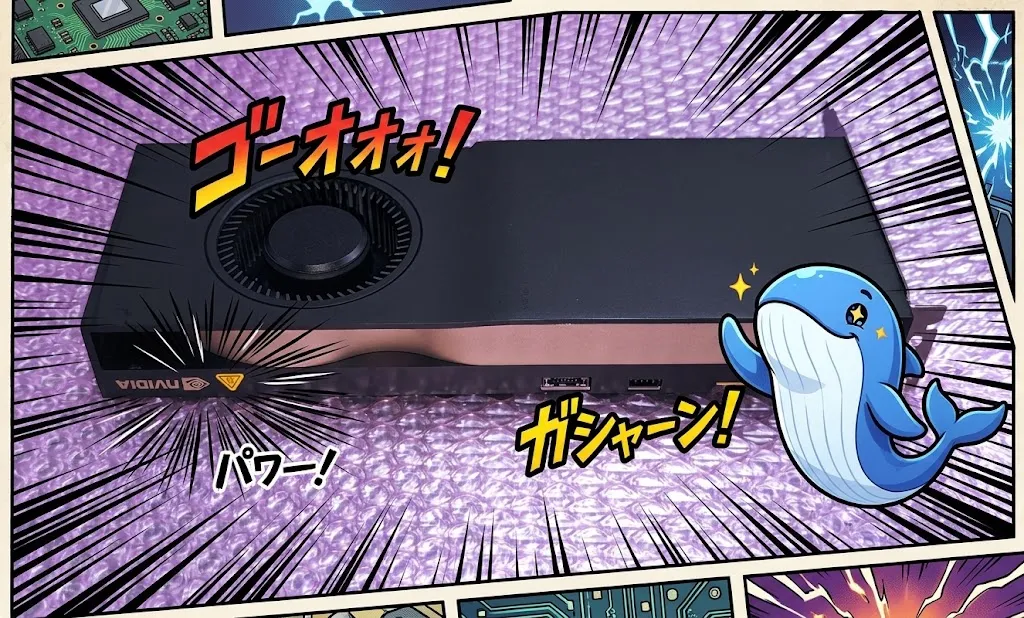
20GB of ECC memory at 640 GB/s, in a 200W dual-slot card. Enough for a 27B model at 4-bit, and easier to power than a used RTX 3090.
The short version
The RTX A4500 is the buy when you want 20GB of CUDA memory and the PC cannot feed a 350W card. NVIDIA rates it at 20GB of ECC GDDR6, 640 GB/s and 200W, which holds Qwen3.8 27B at Q4_K_M and 8K context (about 18GB). A 16GB card does not. Q5 of that model (about 21GB) and a 64K context (about 22GB) still need 24GB, and a used RTX 3090 is faster when the power supply and the price allow it.
In this article
The RTX A4500 is a great buy for one job: 20GB of CUDA memory in a PC that was never going to run a 350W graphics card. NVIDIA’s datasheet gives it 20GB of ECC GDDR6 on a 320-bit bus, 640 GB/s of bandwidth, and a 200W board with a single 8-pin connector. That holds Qwen3.8 27B at Q4_K_M and 8K context, about 18GB by the figures in our VRAM guide. A 16GB card does not hold that model at that quant.
The limit is the other half of the buy. The RTX 3090 has 24GB at 936 GB/s, so the A4500’s 640 GB/s is about 68 percent of a 3090 on any model that fits both cards. Qwen3.8 27B at Q5_K_M is about 21GB, and the same model at Q4_K_M grows to about 22GB once the context reaches 64K. Neither fits. If the power supply can take a 3090 and the listing costs the same, buy the 3090. Used 3090s sold for about $1,050 to $1,450 in October 2026. New and used RTX A4500s were in the same band that month, about $1,100 to $1,400.
What 20GB holds
20GB is the size between a 16GB GeForce card and a 24GB one. Sixteen gigabytes covers models up to about 20B parameters. Twenty-four covers a dense 27B to 31B model with room left for context. The A4500 is the card for the models that fall in the crack.
At 8K context, using the same memory figures as the VRAM guide and the 3090 piece:
- Qwen3.8 27B at Q4_K_M needs about 18GB. It fits, with a couple of gigabytes left. This is the dense model a 16GB card has to quantize harder or spill into system RAM.
- gpt-oss-20b in its native MXFP4 needs about 15GB. It fits, and the leftover memory is context.
- Qwen3.6 35B-A3B at Q3_K_M needs about 19GB. It fits, tightly. Q4_K_M of that model is about 24GB, so it does not.
- Qwen3.8 27B at Q5_K_M needs about 21GB. It does not fit.
- Gemma 4 31B at Q4_K_M needs about 22.5GB. It does not fit.
Context spends the margin. Qwen3.8 27B at Q4_K_M is about 18GB at 8K, about 22GB at 64K, and about 26GB at 128K. On this card, that model is an 8K model. A 27B at Q5, or a 31B at Q4, still wants 24GB. The VRAM calculator is the check for a quant and a context length we have not listed here.
The software is the ordinary CUDA stack. llama.cpp and Ollama treat an A4500 as an Ampere NVIDIA card, the same generation as a 3090, so the setup in our Linux guide applies. It does not gain the FP8 or FP4 hardware on RTX 40 and RTX 50 cards. Token generation still comes down to bandwidth, and 640 GB/s is the number. That matches the Radeon AI PRO R9700, which is also 640 GB/s, with CUDA instead of ROCm and 20GB instead of 32GB.
Against an RTX 5070 12GB
The RTX 5070 is the new card people put next to a used workstation board, and the two are not interchangeable. One is a 12GB Blackwell GeForce card. The other is a 20GB Ampere workstation card. Bandwidth is the surprise: 672 GB/s against 640 GB/s, about 5 percent. On a model that fits in both, llama.cpp and Ollama should generate text at a similar rate. The 5070 does not win that race by having a newer name.
| RTX A4500 | RTX 5070 12GB | |
|---|---|---|
| Memory | 20GB GDDR6, ECC | 12GB GDDR7 |
| Bandwidth | 640 GB/s | 672 GB/s |
| Board power | 200W, one 8-pin | 250W |
| Architecture | Ampere | Blackwell |
| FP8 and FP4 tensor cores | No | Yes |
| NVLink | Two cards, bridge sold separately | No |
| GGUF in llama.cpp and Ollama | Yes | Yes, on a current build |
| FP8 and NVFP4 checkpoints | Not in that precision | Yes, where the runtime supports Blackwell |
| October 2026 price | About $1,100 to $1,400, new or used | About $800 new, $650 used |
What fits is the performance difference that matters for llama.cpp and Ollama. Qwen3.8 27B at Q4_K_M is about 18GB, and gpt-oss-20b in MXFP4 is about 15GB. Both sit on the A4500. Both spill off a 12GB 5070, and ordinary offload, one layer at a time through system RAM, is many times slower than weights that stay on the GPU. The 5070’s comfortable range in those runtimes is the smaller end: Qwen3.5 9B at Q4_K_M is about 7GB, and Q6_K of that model is about 9.5GB. Our catalog’s verdict on the 5070 is the same one: fast memory, capped at 14B-class models. Strata, below, is the exception.
The framework split follows the tensor cores. Ampere stops at FP16, BF16, TF32 and INT8. Blackwell adds FP8 and FP4. NVFP4 is NVIDIA’s 4-bit format for that hardware, and our quantization guide notes that Blackwell has the math for it while a 3090 or a 4090 does not. The A4500 is in that older group. A runtime that dispatches FP8 or NVFP4 kernels, which is where recent vLLM and TensorRT-LLM builds go for serving, can use the 5070 and cannot use the A4500 at that precision. llama.cpp still runs an MXFP4 GGUF, such as gpt-oss, on Ampere. The file loads. The 5070 is the card that can execute FP4 in hardware, and it is also the card that does not have room for the 20B model.
Two practical consequences:
- Pick the 5070 when the model already fits in 12GB, or when the model is DeepSeek-V4.1-Flash and you are willing to run it through Strata. It was about $800 new and $650 used in October 2026. Prompt processing is where Blackwell’s extra compute shows up. We have not measured that head to head against an A4500.
- Pick the A4500 when the model needs 13GB to 20GB and you are staying in llama.cpp or Ollama. The 5070’s newer kernels do not help a 27B model that no longer fits. Keep the context short, and the extra 8GB is the whole argument.
DeepSeek-V4.1-Flash, offloaded through Strata
A 12GB GPU can run DeepSeek-V4.1-Flash now. The weights do not fit in 12GB, or in 20GB. Strata is what makes the offload usable on a normal PC. It pairs ISTA-DASLab’s GSQ-RCO quantizations with layer-major chunked reading: instead of dragging a whole layer across the bus for every token, it reads the expert chunks that token actually needs. Consumer hardware, a desktop GPU plus a lot of system RAM, is enough.
On an RTX 5070 with 64GB of RAM, that run is about 105–117 tok/s. Prefill, reading the prompt, is much faster than decode, writing the reply. Decode is the slower half, and it is not a bad one. This is a great setup for fun: chat, poking at the model, seeing a frontier MoE answer from a 12GB card. More system RAM makes decode faster, because that pass is the one waiting on host memory. The longer walkthrough is Run DeepSeek 4.1 Flash on a 12GB RTX 5070.
The A4500’s extra 8GB does not change this particular model. V4.1-Flash is still an offload, and Strata is the runtime that knows how to do it. Twenty gigabytes still matters for the dense models that have to live on the card. It is not what makes DeepSeek-V4.1-Flash local.
Blackwell also asks more of the driver. RTX 50 cards require NVIDIA’s open kernel modules, as the Linux guide covers. An Ampere board should use those modules too, and it does not have the same hard requirement. Neither card needs the CUDA toolkit unless you are compiling llama.cpp yourself.
A 200W card is the rest of the reason
The memory is why it can run the model. The board is why it goes into machines a 3090 does not.
NVIDIA rates the A4500 at 200W, against 350W for a 3090, and it draws that through one 8-pin connector. The card is dual-slot, 4.4 inches tall and 10.5 inches long, on PCIe 4.0 x16, with four DisplayPort 1.4 outputs. ECC is on. A workstation that already has a sensible power supply, or a desktop that was never sized for a 3090’s power spikes, can take this card without a new PSU and a new case.
It is still a full-height dual-slot board, not a low-profile card and not a single-slot card. Measure the case before treating 200W as a promise that it fits anywhere.
Where to buy
New and used are the same money. In October 2026 an RTX A4500, in box or already owned, was about $1,100 to $1,400. A used RTX 3090 was about $1,050 to $1,450. At that overlap you are choosing the card, not hunting a discount. Amazon is the new listing. eBay is where the used cards actually sold.
Start with Amazon if you want a new board and a retailer return window. These two listings are the ones to open:
RTX A4500, second Amazon listing
That page is a snapshot of the new price, not a promise it will still be there. Tax and shipping sit on top, and a marketplace seller is not the same thing as stock Amazon ships itself. Read the title for 20GB before you add it to the cart.
eBay is the used side of the same range. The sold prices, not the asking prices, are what matched Amazon. A working pull from a workstation at $1,100 to $1,400 is a fair buy. A card with missing parts, a dead fan, or no returns is not cheaper in any way that matters.
Sold comps move around inside that band. One week the cheap card is $1,100 and the next sold listing is closer to $1,400, which is also what a new one costs. Condition is the difference you can see. Memory size should say 20GB in the title, not a sibling card with less.
This first address is a general availability snapshot, a look at what is on offer rather than one card you can check out:
The next two are active listings, individual RTX A4500s you can buy now. Open each one and confirm it is a working 20GB card in the $1,100 to $1,400 band before you pay.
As an eBay Partner, Llama Builds may earn a commission if you buy through the eBay links above. The price you pay is the same either way. How we make money
Memory and bandwidth against the cards above it
The A4500 is not competing with a 96GB workstation card. Those cards cost roughly ten times a used 3090 and hold models this 20GB board cannot. The useful comparison is how much memory and bandwidth each extra thousand dollars buys, and which of those cards still fit the same 200W slot.
The names below are the current Blackwell workstation cards. The 96GB, 84GB, 72GB and 48GB parts are not Ada. Ada is the previous generation, and it is smaller: an RTX 6000 Ada is 48GB at 960 GB/s, an RTX 5000 Ada is 32GB at 576 GB/s, and an RTX 4500 Ada is 24GB at 432 GB/s. The Ampere A4500, at 640 GB/s, has more bandwidth than those Ada 4500 and 5000 cards and less memory than either.
| Card | Memory | Bandwidth | Price |
|---|---|---|---|
| RTX A4500 | 20GB GDDR6 | 640 GB/s | About $1,100 to $1,400, new or used |
| RTX 4500 Ada | 24GB GDDR6 | 432 GB/s | Not checked |
| RTX 5000 Ada | 32GB GDDR6 | 576 GB/s | Not checked |
| RTX PRO 4500 Blackwell | 32GB GDDR7 | 896 GB/s | About $5,000 |
| RTX 5090 | 32GB GDDR7 | 1,792 GB/s | About $4,300 to $5,000 new |
| RTX PRO 5000 Blackwell | 48GB GDDR7 | 1,344 GB/s | About $8,000 |
| RTX 6000 Ada | 48GB GDDR6 | 960 GB/s | About $4,750 used |
| RTX PRO 5000 Blackwell 72GB | 72GB GDDR7 | 1,344 GB/s | About $9,100 |
| RTX PRO 5500 Blackwell | 84GB GDDR7 | 1,398 GB/s | About $11,400 |
| RTX PRO 6000 Blackwell | 96GB GDDR7 | 1,792 GB/s | About $16,000 |
Bandwidth on the Blackwell rows is NVIDIA’s figure. 896 GB/s is about 0.9 TB/s, 1,344 GB/s is about 1.3 TB/s, 1,398 GB/s is about 1.4 TB/s, and 1,792 GB/s is about 1.8 TB/s. The $5,000, $8,000 and $11,400 asks are approximate and are not prices this site has checked. The 72GB PRO 5000, the PRO 6000, the 5090 and the 6000 Ada use the prices already in our catalog. A new 5090 was about $4,300 to $5,000 in October 2026, not $8,000 to $9,000.
Read down the memory column and the A4500 only makes sense under the PRO 4500. That Blackwell card is the same kind of board: 200W, dual-slot, 4.4 by 10.5 inches, with 32GB at 896 GB/s instead of 20GB at 640 GB/s. At about $5,000 it is the new card for this slot. The A4500 is the buy when a used listing is a small fraction of that and 20GB is enough.
Above 32GB you are paying for capacity. The 48GB PRO 5000 and the 72GB PRO 5000 share 1,344 GB/s, so the extra $1,000 or so is 24GB, not more speed. The 84GB PRO 5500 adds a little bandwidth, to 1,398 GB/s, at about $11,400 and up to 600W. The 96GB PRO 6000 matches a 5090’s 1,792 GB/s and costs about $16,000. A 5090, at about $4,300 to $5,000, has that same bandwidth with 32GB, if the PC can feed a 575W card. None of those is a substitute for a cheap 20GB Ampere board, and a cheap 20GB board is not a substitute for them.
Against the other 20GB card, and against 16GB
The RTX 4000 Ada is the other 20GB workstation card we track. It also has ECC GDDR6. Bandwidth is 360 GB/s, a bit over half the A4500, in a single slot at 130W. NVIDIA’s launch price was $1,250, and we do not have a reliable October 2026 street price for it either.
Same 20GB, different jobs. The 4000 Ada is the card when the case has one slot left and the power budget is small. The A4500 is the card when you can spare two slots and 200W and you want the model to answer faster. Once the weights fit, bandwidth is the speed.
A new 16GB card is the other way to spend the money. The RTX 5070 Ti has 16GB at 896 GB/s, FP4, and a warranty, at about $1,200 new in October 2026. It is quicker than an A4500 on anything that fits in 16GB, including gpt-oss-20b. It is the wrong card for Qwen3.8 27B at Q4_K_M, which is the model that makes the A4500’s extra 4GB worth buying.
Two of them
NVIDIA sells an NVLink bridge that connects two A4500s. The datasheet rates the link at 112.5 GB/s bidirectional and says the pair can present 40GB, if the application supports NVLink. The bridge is a separate part.
llama.cpp and Ollama do not need it. They split a model across cards by layer over PCIe, which moves very little data between the GPUs. That is the same split described in the 3090 guide. NVLink matters for tensor-parallel runtimes and for training. Two boards are also 400W, still well under two 3090s, and the case has to accept two dual-slot cards.
A used HP Z6 G5 is the chassis to look at for one of these cards, or for two. HP rates that tower for up to three dual-width GPUs, and the A4500 is the same 4.4 by 10.5 inch dual-slot shape those slots were built around. The machines are easy to find on eBay, and the useful part is that the CPU and ECC memory usually come with the case. The Z6 G5 is a single Intel Xeon W. The AMD version is the Z6 G5 A, which uses a Threadripper PRO, not an EPYC. Read the listing so you know which CPU you are getting. This address is a general look at what is available:
As an eBay Partner, Llama Builds may earn a commission if you buy through the link above. The price you pay is the same either way. How we make money
When to buy something else
- The power supply can run a 3090, and the A4500 is not cheaper. Buy the 3090. You get 24GB, 936 GB/s, and the models that miss 20GB.
- The model already fits in 12GB, and you want FP8 or NVFP4. Buy the RTX 5070. Bandwidth is almost the same as an A4500, the card is new, and Blackwell runtimes can use those formats. If the model needs more than 12GB, that advantage disappears.
- You need more than 20GB on one card. Gemma 4 31B at Q4_K_M, and a 27B model at a long context, are already over this board. The next step in the same 200W slot is an RTX PRO 4500 Blackwell, at 32GB and 896 GB/s for about $5,000. Past that, a 3090, an RTX 5090, or one of the 48GB-and-up workstation cards in the table above. The RTX A6000 sold for about $4,400 used in October 2026.
- The case has a single slot free. The RTX 4000 Ada is the card that fits. The A4500 is the faster 20GB card, not the smaller one.
For a CUDA card that has to clear 16GB without a 3090’s power draw, this is the one. Keep the context short on a 27B model, and check the asking price against a used 3090 before you pay it.
If you’d like to try this GPU before you buy, consider renting on vast.ai.
Buying advice
Our GPU picks for local AI
Best overall
RTX 3090Best budget
RTX 5060 Ti 16GBFastest consumer GPU
RTX 5090Best for multi-GPU builds
R9700
We may earn a commission when you buy through links on this page. It never changes what we recommend. How we make money
Frequently asked questions
How much memory does the RTX A4500 have?
20GB of GDDR6 with ECC, on a 320-bit bus, for 640 GB/s. NVIDIA rates the board at 200W, with one 8-pin power connector, in a dual-slot card that is 4.4 inches tall and 10.5 inches long.
Can an RTX A4500 run a 27B model?
Yes, at Q4_K_M and a short context. Qwen3.8 27B at Q4_K_M needs about 18GB at 8K context, which fits in 20GB. The same model at Q5_K_M is about 21GB, and at Q4_K_M with 64K context it is about 22GB. Those do not fit.
Is an RTX A4500 better than a used RTX 3090?
When 200W matters more than speed. The RTX 3090 has 24GB at 936 GB/s and draws 350W. Used 3090s sold for about $1,050 to $1,450 in October 2026. Buy the A4500 when the listing is in that range or below and the PC cannot feed a 3090.
How does the RTX A4500 compare with an RTX 5070 12GB?
The RTX 5070 has 12GB at 672 GB/s and Blackwell FP8 and FP4 tensor cores. The A4500 has 20GB at 640 GB/s and does not. On a model that fits in 12GB, llama.cpp and Ollama should be close, because generation follows bandwidth. The 5070 cannot hold Qwen3.8 27B at Q4_K_M (about 18GB) or gpt-oss-20b (about 15GB) without offloading. It can run DeepSeek-V4.1-Flash through Strata, which offloads expert chunks from system RAM. With 64GB of RAM that setup is about 105 to 117 tok/s. Prefill is much faster than decode, and decode is still pleasant. The A4500's extra memory does not hold that model on the card.
Read next
More from Llama Builds
Explainer
Run DeepSeek 4.1 Flash on 12GB nVidia RTX 5070
DeepSeek 4.1 on a 12GB RTX 5070. What fits, what spills to system RAM, and when to step up.
Updated Oct 26, 2026
Opinion
Is the RTX 3090 still the best GPU for local AI in 2026?
Six years after launch, it's still the card I tell most people to start with. Here's why, and where it stops being the right answer.
Updated Oct 14, 2026
Buying guide
The best GPUs for running AI models locally (2026)
Memory decides which models you can run, and memory bandwidth decides how fast they answer. These are the cards that give you the most of both for the money.
Updated Oct 14, 2026